Apr 2025
In our racing engine, Blender is the level editor. Artists and designers set up scenes, assign custom properties to objects, and export to glTF. The engine reads those properties and uses them to create the right components, like physics bodies, sounds, splines, prefabs, without any editor in the engine. This post covers how that pipeline works.
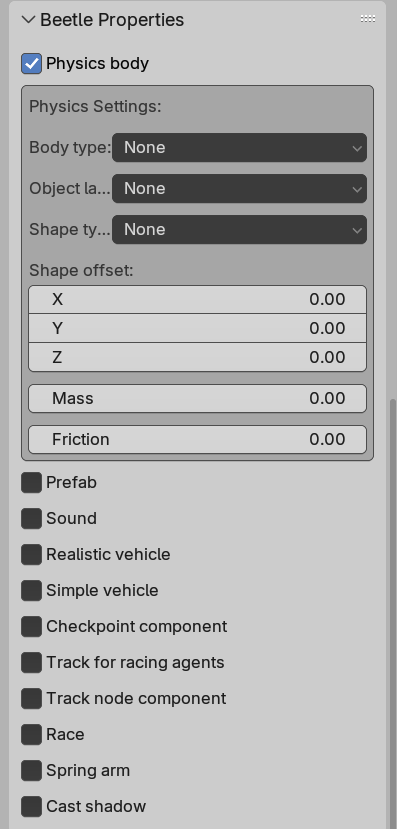
Blender addons can register custom properties on objects and display them in panels:
bpy.types.Object.physics = bpy.props.BoolProperty(
    name="Physics body",
    description="Enable physics body",
    default=False
)

class OBJECT_PT_object_properties(bpy.types.Panel):
    bl_label = "Beetle Properties"
    bl_idname = "OBJECT_PT_object_properties"
    bl_space_type = "PROPERTIES"
    bl_region_type = "WINDOW"
    bl_context = "object"

    def draw(self, context):
        layout = self.layout
        obj = context.object
        layout.prop(obj, "physics")
        if obj.physics:
            box = layout.box()
            box.prop(obj, "body_type")
            box.prop(obj, "shape_type")
            box.prop(obj, "mass")
            box.prop(obj, "friction")
When exported to glTF, these properties end up in the node’s extras JSON field. Anything you can represent as a bool, int, float, string, or an array of those types can be exported through this pipeline.
On the engine side, we use fastgltf for loading. It provides an extras callback that is called per node, giving you a simdjson object to parse:
void Model::ExtrasCallback(simdjson::dom::object* extras,
                           std::size_t objectIndex,
                           fastgltf::Category category,
                           void* userPointer)
{
    if (!extras) return;
    Model* model = static_cast(userPointer);

    for (auto [key, value] : *extras)
    {
        std::string keyStr = std::string(key);
        auto& [extraData] = model->m_extras[objectIndex];

        if (value.is_int64())
        {
            int64_t val = 0;
            value.get_int64().get(val);
            extraData[keyStr] = static_cast(val);
        }
        // ... same for float, bool, string, arrays
    }
}
The parsed data is stored per node index using std::variant to handle all the types that the Blender properties can create:
using GLTFExtra = std::variant<
    float, int, bool, std::string,
    std::vector<float>,
    std::vector<int>,
    std::vector<bool>,
    std::vector<std::string>,
    std::vector<std::vector<float>>
>;

struct GLTFExtras
{
    std::unordered_map<std::string, GLTFExtra> data;
};
During instantiation, if a glTF node has extras, they get stored in a component:
auto it = m_extras.find(nodeIdx);
if (it != m_extras.end())
{
    Engine.ECS().CreateComponent(entity, it->second.data);
}
After loading a scene, one pass over all GLTFExtras components creates the actual components. Each property maps to specific setup logic:
for (auto [entity, extras] : Engine.ECS().Registry.view().each())
{
    auto physicsIt = extras.data.find("physics");
    if (physicsIt != end && std::get(physicsIt->second))
    {
        auto& rigidBody = Engine.ECS().CreateComponent(entity);
        // read body_type, shape_type, mass, friction from extras...
    }

    auto soundIt = extras.data.find("sound");
    if (soundIt != end && std::get(soundIt->second))
    {
        auto eventIt = extras.data.find("sound_event");
        std::string event = (eventIt != end)
            ? std::get(eventIt->second) : "";
        Engine.ECS().CreateComponent(entity, event);
    }
}
This is essentially a data driven entity factory. Adding a new component type to the pipeline simply means: register a Blender property, add a branch in this loop. Nothing else.
One property we added is prefab: a path to another glTF file. When the converting loop processes it, it instantiates that glTF into the scene. Blender already has file linking for referencing objects across .blend files, which we used for collaboration. Prefabs solved a different problem: swapping what gets loaded at a point in the scene by changing a single path string, without restructuring the Blender file.
This kept the iteration loop short: edit in Blender, press export, reload in engine. Everything configurable lives in one place.